
Large contracts often contain multiple supporting documents - exhibits, schedules, appendices, and more.
Tracking and verifying them manually can be time-consuming and error-prone.
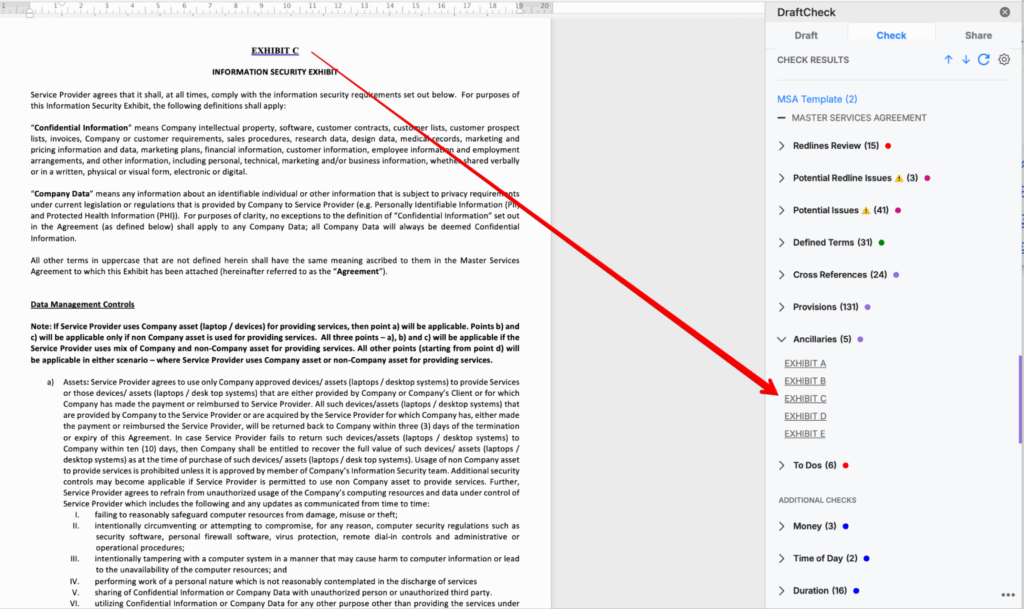
That’s why DraftCheck includes Ancillary Finder, a smart feature that automatically locates and organizes all referenced ancillary documents across your agreements.
🔍 What It Detects
Ancillary Finder scans through contracts to detect phrases that begin with any of the following keywords:
- Exhibit
- Schedule
- Attachment
- Appendix
- Addendum
- SOW (Statement of Work)
- Statement of Work
- Amendment
- Annex
- Rider
For all terms except “Rider,” it captures the keyword + 1–5 trailing characters, for example:
Exhibit A, Schedule 1.2, Appendix III
This means DraftCheck recognizes even complex numbering and lettering patterns — no matter how the document is formatted.
⚙️ How It Works
- Formatting is ignored - The tool works on plain text, so it detects ancillaries even if they aren’t bolded, linked, or styled.
- Flexible matching - Captures references whether they appear in headings, clauses, or inline text.
Why It Matters
🔹 Visibility: Quickly locate all referenced exhibits, schedules, and attachments.
🔹 Accuracy: Ensure no ancillary document is overlooked during review.
🔹 Efficiency: Save time by automatically identifying every related document reference — even in large, complex agreements.